Reconcile intercompany
in minutes, not hours.
Built for bookkeeping and CPA firms managing multi-entity clients on QuickBooks Online. Connect once, reconcile every month, push offsetting journals with a click.
Built by a practicing CPA
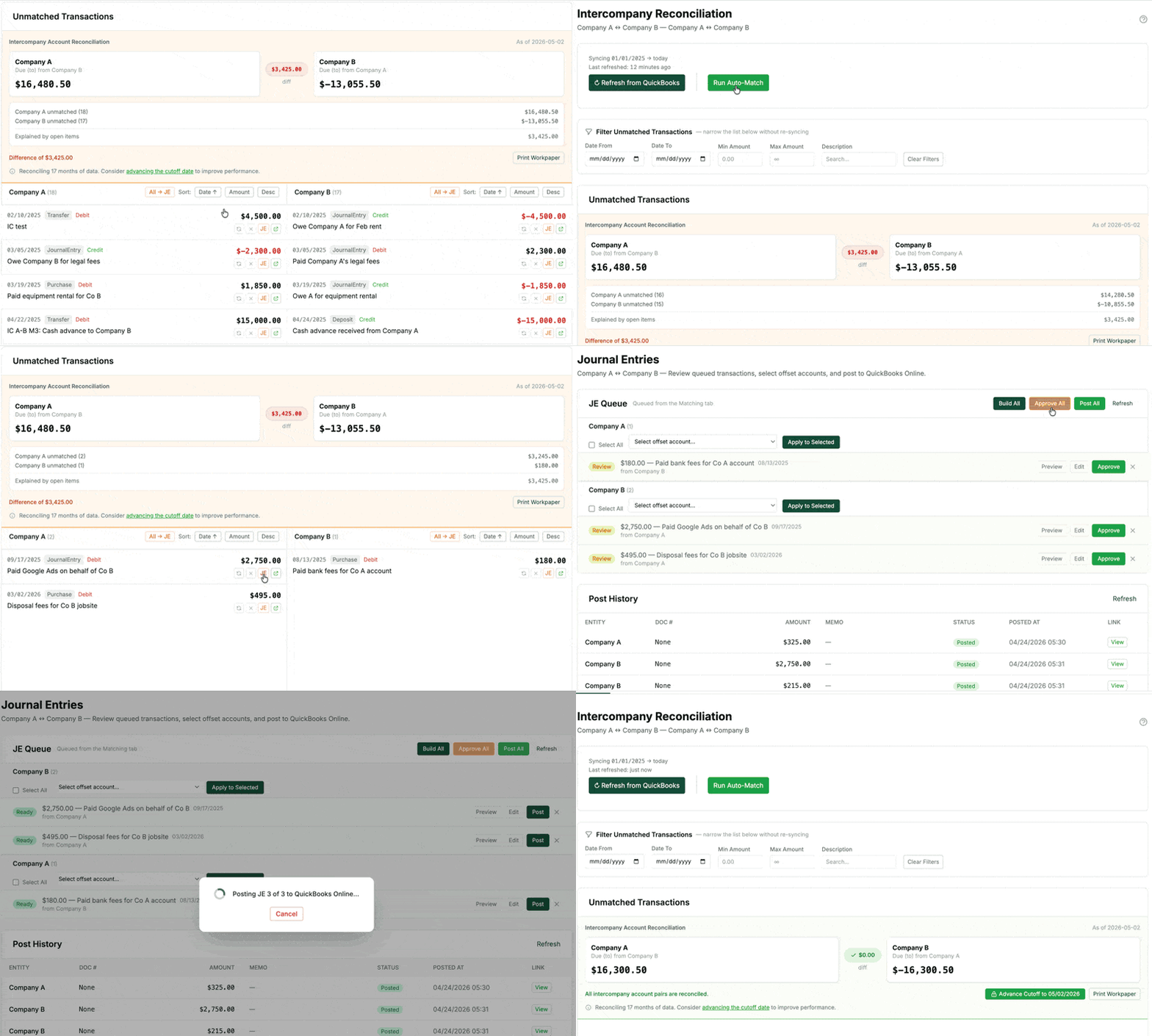
Step 1
Connect
OAuth to unlimited QuickBooks Online companies
Step 2
Match
Auto + manual, by amount and date
Step 3
Push
Offsetting JE straight to each ledger
Step 4
Close
Print-ready workpaper in one click
See it in action
From mismatched to closed in under two minutes.
A full walkthrough — connect two QuickBooks Online entities, auto-match, build, post.
OAuth-only access
We never see or store your QuickBooks login. Intuit's OAuth 2.0 tokens are the only credential, and you can revoke access with one click.
Encrypted at rest
Every token is encrypted with AES-256 before it touches the database. Secrets are never written to logs.
Your data stays put
DueToFrom reads transactions to match them and writes the journals you post. Nothing leaves your QuickBooks books until you click Post.
Common questions
Before you connect an entity.
Do you ever see my QuickBooks login?
No. We use Intuit's OAuth 2.0 flow — you authenticate with Intuit, we receive a revocable token. Your username and password never touch our servers.
What happens to my data if I disconnect an entity?
Your tokens are destroyed immediately and we stop reading from that QuickBooks company. Any reconciliation history, matched transactions, and pushed journal entries stay in your DueToFrom account so you can reference them later. You can also permanently delete everything at any time.
Does it support class and location tracking?
Yes. When you build a journal entry, the offset account selector automatically pulls the target entity's Classes and Locations if they're enabled in QuickBooks Online. Professional and Firm plans can apply class/location coding across multiple pending entries in bulk.
Can my bookkeeper use this without seeing everything?
Yes. Bookkeeper-role users only see the specific IC pairs you grant them access to. They can match and build journal entries — but only owners and admins can post them to QuickBooks.
Which QuickBooks products are supported?
QuickBooks Online only — all flavors (Simple Start, Essentials, Plus, Advanced). QuickBooks Desktop is not supported.
Is there a free plan?
Yes — the Free plan supports 2 connected entities and unlimited IC pairs, with transaction matching and a watermarked workpaper preview. Pushing journal entries to QuickBooks requires a paid plan. No credit card needed.
Ready to kill the spreadsheet?
Free plan, no credit card. Connect your first two entities in under 5 minutes.